For independent businesses in San Ysidro, California, choosing the right point-of-sale (POS) system involves more than selecting a card reader or cash register. The right system can help business owners process payments, manage inventory, monitor sales, and understand customer purchasing patterns. The wrong choice, however, can introduce unnecessary costs, complicate daily operations, and make it harder to manage cash flow.
Restaurants, convenience stores, clothing retailers, salons, and service providers all have different operational needs. A restaurant may need table management and kitchen order routing, while a small retailer may prioritise barcode scanning and inventory tracking. A salon may require appointment scheduling and customer records alongside payment processing.
With many payment providers offering different pricing structures and features, comparing options can take time. Business owners should start by understanding their requirements, evaluating the total cost, and checking whether a system can support their operations as the business grows.
This guide explains the main factors San Ysidro business owners should consider before choosing a POS system, including payment security, hardware, reporting tools, and customer support.
Needs
The first step is to identify what your business actually needs from a POS system. A long list of features may look appealing, but paying for tools you rarely use can increase operating expenses without improving efficiency.
Start by reviewing your daily transactions and administrative tasks. Consider how customers pay, how you record sales, how you track inventory, and how you handle refunds or exchanges. If employees regularly enter the same information into multiple systems, an integrated POS solution may help reduce repetitive work.
Different business types require different capabilities.
- Retail stores: Barcode scanning, stock alerts, product variations, and supplier records.
- Restaurants and cafés: Menu management, order routing, table tracking, and split bills.
- Salons: Appointment scheduling, customer profiles, and staff commission tracking.
- Service businesses: Invoicing, deposits, recurring payments, and customer records.
- Convenience stores: Fast checkout, cash handling, barcode support, and sales summaries.
Independent businesses should also consider how many employees will use the system and whether it needs to support multiple checkout stations. A business with one checkout counter may not need the same setup as a shop with several employees serving customers simultaneously.
Write down the features that are essential, useful, and unnecessary. This simple exercise provides a consistent basis for comparing providers.
Costs
The advertised price of a POS system rarely tells the whole story. Business owners should examine the complete cost of ownership, including hardware, software subscriptions, transaction fees, accessories, and optional services.
Some providers offer a basic software plan with a monthly subscription, while others bundle software and payment processing into a single package. Hardware may be purchased upfront, rented, or included under certain conditions. Contract terms and cancellation fees can also affect the total expense.
Payment processing deserves particular attention because the fees accumulate with every transaction. Providers may charge a percentage of the payment, a fixed amount per transaction, or different rates depending on how the payment is accepted.
Consider a hypothetical business that processes $30,000 in card payments each month. If its effective processing rate were 2.5%, the estimated processing cost would be $750 per month, excluding any additional fixed fees or other charges.
| Monthly card sales | Illustrative rate | Estimated fee |
|---|---|---|
| $10,000 | 2.5% | $250 |
| $30,000 | 2.5% | $750 |
| $50,000 | 2.5% | $1,250 |
These figures are examples, not quoted rates from a payment provider. Actual costs depend on transaction types, pricing arrangements, card networks, and contract terms.
Business owners should request a written fee schedule and compare providers using their actual monthly sales volume and average transaction value. They should also ask whether refunds, chargebacks, hardware replacements, or additional employee accounts incur separate charges.
Payments
A POS system should support the payment methods your customers commonly use. Depending on the business, these may include contactless cards, chip cards, mobile wallets, and traditional cash payments.
For a business in San Ysidro, where customers may include local residents, workers, and visitors, offering familiar and convenient payment options can help reduce checkout friction. However, the specific mix of payment methods should be based on customer demand rather than assumptions about the local market.
Check whether the system supports the card networks and payment types your customers use. Ask whether contactless payments are included, whether cash transactions can be recorded alongside card sales, and how the system handles tips, refunds, and split payments.
If your business accepts payments in person and online, determine whether the provider can consolidate transactions into a single reporting system. Unified reporting can make reconciliation easier and provide a clearer picture of total sales.
Businesses should also confirm how deposits reach their bank accounts and whether settlement schedules vary by payment method. Predictable access to funds is important for covering payroll, supplier invoices, and other operating expenses.
Before signing an agreement, review the provider’s transaction pricing and contract terms carefully. A convenient checkout experience is valuable, but it should be supported by transparent costs and dependable payment processing.
Inventory
Inventory management can be one of the most useful functions of a retail POS system. Instead of maintaining separate spreadsheets and manually updating stock after every sale, business owners may be able to track inventory automatically as transactions occur.
Useful features include barcode scanning, low-stock alerts, product variants, purchase records, and stock adjustment tools. Businesses selling clothing, for example, may need to track several sizes and colours for each product. A convenience store may prioritise quick scanning and frequent replenishment.
Restaurant operators have different requirements. They may need to track ingredients, manage menu availability, and identify popular dishes. Some systems provide ingredient-level inventory tools, while others require an integration or separate application.
Before choosing a provider, check how easily the system handles stock deliveries, returns, damaged goods, and manual corrections. If you sell products at multiple locations, confirm whether inventory can be synchronised across sites.
The system should also make it easy to identify slow-moving items and products that regularly sell out. This information can help owners make better purchasing decisions and reduce the risk of tying up working capital in excess stock.
However, inventory features should match the scale of the operation. A small business with a limited product range may be better served by a straightforward system than by an expensive platform designed for complex supply chains.
Reporting
Sales reports can help business owners understand which products generate revenue, when demand is strongest, and how sales vary across days or seasons.
A useful POS system should provide clear summaries of gross sales, refunds, discounts, taxes, payment methods, and transaction activity. Depending on the provider, it may also offer employee performance reports, inventory analytics, and customer purchasing insights.
For example, a retailer could use product-level reports to identify items that sell consistently and those that remain on shelves. A café could compare sales by hour to help plan staffing levels. A salon could monitor appointment revenue and identify which services contribute most to monthly sales.
Reporting tools are most valuable when owners review them regularly and use the information to make practical decisions. A dashboard filled with complicated metrics is less useful if it does not answer the questions that matter to the business.
Check whether reports can be exported into spreadsheets or accounting software. Reliable exports can reduce manual data entry and help prepare financial records for bookkeeping and tax reporting.
Businesses should also examine how the system distinguishes sales from refunds, taxes collected, tips, and payment processing fees. Revenue reports alone do not show net profit, so the POS system should complement, rather than replace, proper accounting records.
Security
Payment security should be a central consideration when selecting a POS system. Businesses handle sensitive transaction information and must understand how their provider protects payment data.
Ask whether the provider supports appropriate payment security standards, including applicable Payment Card Industry Data Security Standard (PCI DSS) requirements. Confirm which security responsibilities belong to the provider and which remain with the business.
Useful safeguards may include employee-specific accounts, permission controls, secure authentication, software updates, and activity logs. These features can reduce the risk of unauthorised access and make it easier to investigate unusual transactions.
Owners should avoid sharing administrator credentials among employees. Staff should receive only the permissions needed for their roles, particularly when processing refunds, applying discounts, or accessing reports.
It is also important to know how the system handles customer information. If the business stores contact details, purchase histories, or marketing preferences, it should review the provider’s privacy policies and data retention practices.
The official PCI Security Standards Council website provides information about payment card security standards. Businesses can use its resources to better understand relevant security requirements and discuss responsibilities with their payment provider.
Hardware
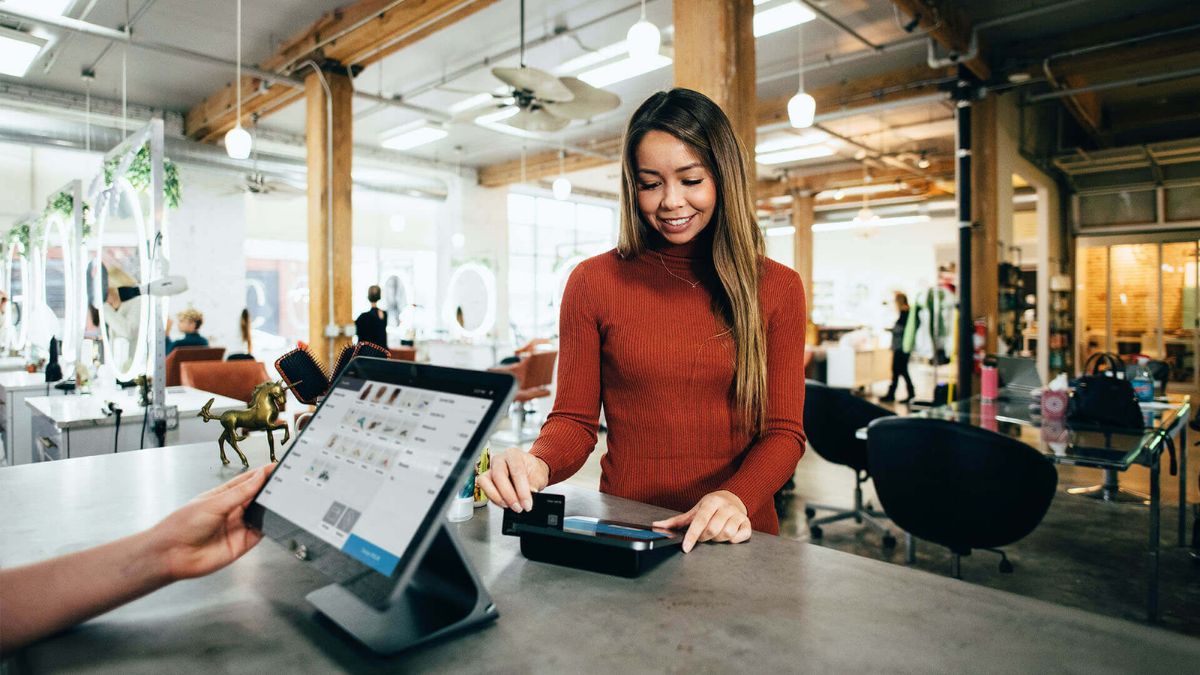
Hardware requirements depend on the business environment and checkout process. Some businesses need only a tablet and a card reader, while others require a full countertop terminal, receipt printer, barcode scanner, cash drawer, or customer-facing display.
Retailers with high transaction volumes may benefit from dedicated terminals designed for continuous use. Small service businesses may prefer portable devices that allow payments to be taken at a table, reception desk, or customer’s location.
Before buying hardware, confirm that it is compatible with the provider’s software and payment processing service. A device that works with one platform may not be supported by another.
Consider the physical environment, too. A restaurant may need equipment that can withstand frequent handling, while a mobile service provider may prioritise battery life and portability. Businesses should check warranty coverage, replacement costs, and the availability of technical support.
Internet connectivity is another important consideration. Some POS systems offer limited offline transaction capabilities, while others require a stable connection for most functions. Offline features may have restrictions, and transactions accepted during an outage can carry additional risks.
Ask the provider exactly what happens if the internet connection fails. Determine whether sales can continue, how transactions are stored, and when they are transmitted for processing. Do not assume that an offline mode guarantees every payment will be approved.
Integration
A POS system becomes more useful when it works with the other tools a business already relies on. Accounting software, ecommerce platforms, payroll applications, booking systems, and customer relationship tools may all be relevant.
For example, integrating POS transactions with accounting software can reduce manual entry and make reconciliation more efficient. A retailer with an online store may benefit from synchronised stock levels, while a salon may need its checkout system to connect with an appointment calendar.
Before choosing a provider, identify the applications you currently use and those you expect to adopt in the next few years. Ask whether the required integrations are included in the subscription or require additional fees.
It is also worth confirming whether integrations synchronise information automatically or require manual exports. Some connections transfer only basic sales data, while others support more detailed inventory or customer records.
If your business has complex requirements, request a demonstration using a realistic workflow. For example, ask the provider to show how an in-person sale affects inventory, accounting records, and online stock availability.
A system that fits existing workflows can reduce administrative work. However, integrations should solve a defined problem rather than add unnecessary complexity.
Support
Technical problems can interrupt sales and affect customer service. Before selecting a POS provider, assess the support options available and how quickly assistance is likely to be provided.
Check whether support is available by telephone, live chat, email, or an online help centre. Ask about operating hours, weekend coverage, response times, and whether urgent payment issues receive priority.
San Ysidro businesses with evening or weekend trading hours should pay particular attention to support availability. A provider whose assistance is limited to weekday office hours may not suit a business that operates outside those times.
Training is also important. Employees should understand how to process sales, issue refunds, close registers, and handle common errors. A provider that offers onboarding, practical guides, and staff training may make the transition easier.
Before committing, review the provider’s cancellation policy and data export options. If the business later changes systems, it should know how to retrieve sales records, customer information, and inventory data in a usable format.
A short trial or product demonstration can help owners assess the interface and identify potential problems before the system becomes part of daily operations.
Comparison
Once you understand your requirements, compare a shortlist of providers using the same criteria. This reduces the risk of choosing a system based mainly on promotional pricing or an attractive demonstration.
The following table outlines a practical evaluation framework.
| Factor | What to check |
|---|---|
| Total cost | Subscription, hardware, processing, and extra fees |
| Payment support | Cards, contactless payments, cash, and refunds |
| Inventory | Stock tracking, alerts, and product variations |
| Reporting | Sales summaries, exports, and accounting tools |
| Security | Access controls, updates, and payment protections |
| Hardware | Compatibility, durability, and replacement options |
| Integration | Accounting, booking, payroll, and ecommerce |
| Customer support | Availability, training, and troubleshooting |
| Contract terms | Cancellation, data access, and transfer options |
Give greater weight to the factors that affect your daily operations. A retailer with hundreds of products may prioritise inventory management, while a service provider may place more emphasis on scheduling and invoicing.
Request written quotes based on your estimated sales volume and expected hardware needs. Compare the total costs over at least 12 months, and consider longer-term expenses if the provider requires a contract.
Avoid paying for advanced features solely because they are available. The goal is to select a reliable system that meets current requirements and can accommodate reasonable future growth.
Implementation
Choosing the system is only the beginning. A planned implementation can reduce disruption and help employees become comfortable with the new process.
Start by preparing product records, prices, tax settings, inventory information, and employee permissions. If customer records need to be transferred, confirm the available export and import formats before the old system is discontinued.
Test the setup before using it for regular trading. Process sample sales, refunds, discounts, cash transactions, and card payments. Check that receipts are accurate and that sales reports reconcile with transaction records.
Train employees on the tasks they will perform most often. Provide simple instructions for opening and closing registers, handling failed transactions, and contacting support. Assign a responsible person to oversee the transition and record any recurring problems.
During the first few weeks, review processing fees, transaction accuracy, reporting quality, and staff feedback. Small adjustments made early can prevent avoidable difficulties from becoming routine.
Independent businesses in San Ysidro do not all need the same POS solution. The most appropriate system is one that fits the business model, supports the payment methods customers use, provides reliable records, and offers transparent pricing. By comparing actual needs, reviewing security and contract terms, and testing the system before committing, business owners can make a more informed decision and establish a checkout process that supports daily operations and future growth.
FAQs
What is a POS system?
A POS system processes sales and can manage payments, inventory, and reports.
How much does a POS system cost?
Costs vary by software, hardware, transaction fees, and additional services.
Do small businesses need POS inventory tools?
They help businesses track stock, although needs vary by product range.
Can a POS system work without internet?
Some systems offer limited offline features, subject to provider restrictions.
What should businesses check before buying a POS?
Compare costs, payment support, security, integrations, and customer service.